5 High-Converting Lead Magnet Templates for Lifestyle Blogs
5 High-Converting Lead Magnet Templates for Lifestyle Blogs – lifestyle blog lead magnet templates
Building a profitable subscriber base starts with offering immediate, practical value. If you’re struggling with stagnant email growth, deploying targeted lifestyle blog lead magnet templates will completely change how readers interact with your site. Most visitors bounce without a second thought when greeted by a generic “join my newsletter” box. They don’t want more inbox clutter. By offering high-converting lead magnet templates tailored specifically for lifestyle blogs, you replace vague promises with plug-and-play tools that solve real daily headaches.
Table of Contents
- Why Generic Opt-Ins Fail and How Template Frameworks Drive Growth
- How to Select the Best Lead Magnet Framework for Your Audience
- Template Framework 1: The Printable Routine and Habit Tracker Checklist
- Template Framework 2: The Interactive Capsule Wardrobe and Decor Audit
- Template Framework 3: The Curated Meal Plan and Grocery Optimization Sheet
- Customizing Your Lead Magnet Assets in Canva and Notion
- The Fill-in-the-Blank Copywriting Wireframe for High-Converting Landing Pages
- Technical Setup and Automated Email Delivery Systems
- Post-Launch Performance Metrics and Diagnostic Audit
- Turning Download Subscribers into an Engaged, Monetized Community
The standard “stay in touch” footer form is officially dead. Across home, beauty, wellness, and parenting niches, generic opt-in bars yield sub-1% opt-in rates. Why? Lifestyle content is aspirational, but readers take action only when you hand them tangible structure. When someone reads an article on simplifying their morning or refreshing their seasonal wardrobe, they feel inspired. Yet inspiration fades quickly without a clear next step. Asking them to sign up for “weekly inspiration” asks for trust without giving them anything useful first.
The secret lies in shifting from passive announcements to active micro-solutions. Instead of spending weeks writing a 40-page ebook nobody will finish, top creators rely on fill-in-the-blank assets. Think of a one-page pantry inventory, a clean skincare ingredient checklist, or a 10-minute bedtime habit tracker. These tools give readers a quick win in under five minutes. When you solve a tiny, irritating problem right away, your subscriber views you as an authority they can rely on every week.
Many independent creators ask whether pre-built assets are actually worth the effort compared to writing custom content from scratch. As creators regularly point out when discussing pitfalls in list-building workflows, bloggers burn out by over-designing complex downloads that don’t match reader intent. Using structured template systems cuts your production time from days to minutes. You don’t need expensive graphic designers either. Pairing a lightweight template built in Canva or Notion with an email marketing engine like Kit (formerly ConvertKit) or Flodesk lets you deliver polished, automated opt-ins without touching a line of code.
High-performing lifestyle blogs don’t treat list building as an afterthought. They weave specific, problem-solving lead magnets into their highest-traffic articles. The following sections walk through the exact frameworks, customization tricks, and copy templates you need to turn casual visitors into raving subscribers.
How to Select the Best Lifestyle Blog Lead Magnet Templates for Your Audience
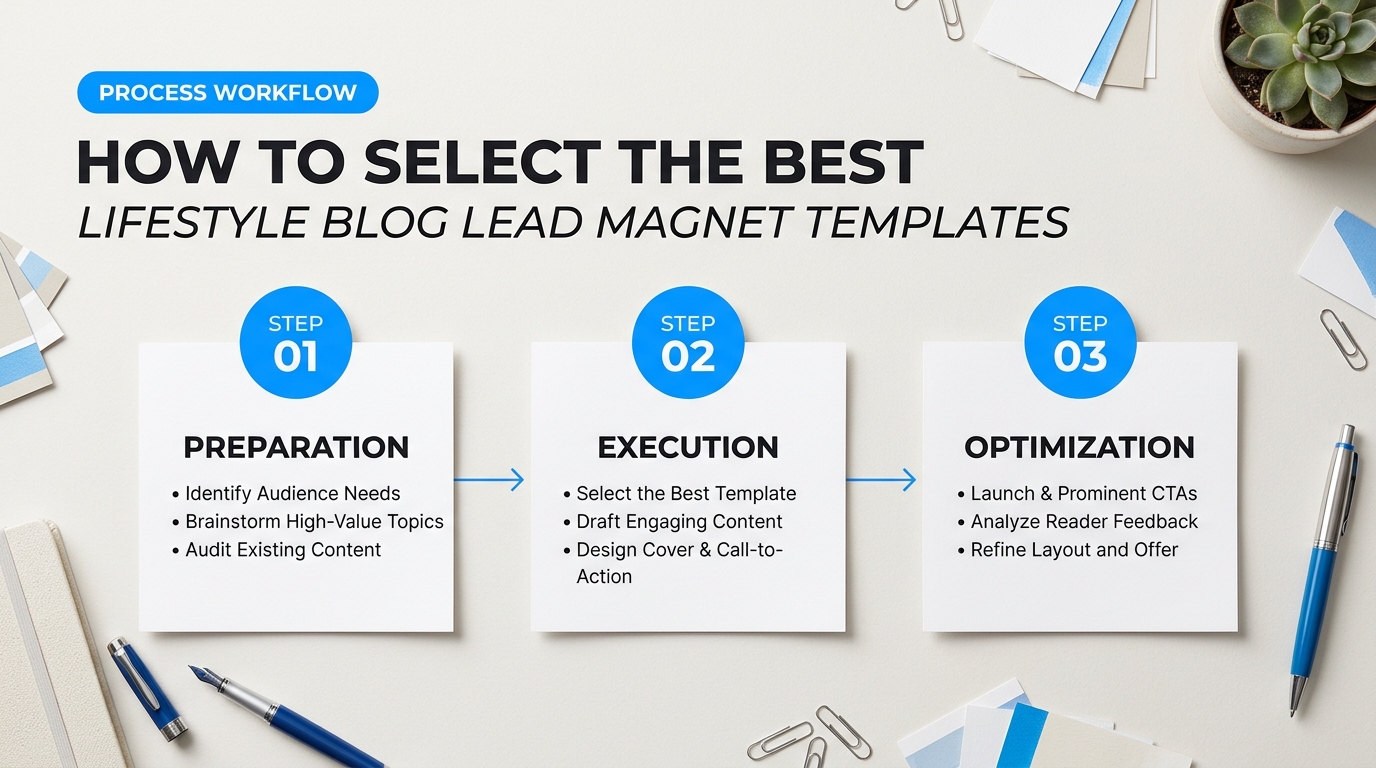
Most creators spend three weeks designing a forty-page digital book only to watch their opt-in numbers stall. Readers rarely want another long manual to store on their hard drive. They want a direct answer to an immediate problem. In lifestyle blogging, your opt-in offer must deliver a tangible win within fifteen minutes. If a parent balancing groceries and a crying toddler can’t glance at your afternoon schedule guide and immediately feel calmer, they won’t open your emails next week.
In community marketing discussions on lead magnet pitfalls, creators frequently debate whether premade template frameworks outperform manual design workflows. The reality is simple: pre-built layouts save dozens of design hours, but only if the document structure fits how your specific audience consumes information. Selecting the wrong format creates unnecessary friction before the reader even reads page one.
| Lifestyle Sub-Niche | Audience Mindset | Optimal Format | Primary Deliverable |
|---|---|---|---|
| Minimalist Living & Decluttering | Overwhelmed, seeking visual order and speed. | Actionable One-Pager | Single-room checklist or 30-day purge tracker. |
| Family Routines & Parenting | Distracted, time-poor, managing household friction. | Printable Daily Planner | Chore distribution grid or morning routine board. |
| Capsule Fashion & Personal Styling | Reflective, creative, looking for curation. | Multi-Page Workbook | Color palette worksheet and wardrobe audit. |
| Slow Living & Sustainable Decor | Research-oriented, selective, budget-conscious. | Curated Resource Index | Vetted brand directory or seasonal swap sheet. |
Matching Sub-Niches to Lifestyle Blog Lead Magnet Templates
Every reader arrives with an invisible threshold for cognitive load. Think of this load like phone battery life. A visitor searching for kitchen organization ideas usually has 5% battery left. They don’t have the patience to read long essays. In contrast, someone planning a seasonal wardrobe refresh is usually relaxing on a Sunday afternoon with 80% battery. Your format choice needs to match that mental energy.
Here is how to evaluate the three primary document styles against your content focus:
- The Actionable One-Pager: Best for high-urgency niches like daily chore organization, pantry decluttering, or emergency weeknight dinners. Keep all typography legible at arm’s length so the reader can stick the sheet to their refrigerator. If the task takes more than one page to explain, trim the scope of the project.
- The Multi-Page Workbook: Best for transformative lifestyle topics like finding personal style, digital detox challenges, or holistic habit resets. Limit these files to five to seven pages. Include fillable prompt areas, clear evaluation scales, and brief self-assessments so the reader actively participates instead of skimming.
- The Curated Resource List: Best for sustainable living, thrift shopping guides, and interior decor sourcing. Curated lists solve analysis paralysis. Readers value your discernment here; you are filtering hundreds of confusing online shopping options into twenty reliable recommendations.
“If your lead magnet takes more than twenty minutes to start, your completion rate drops through the floor. Choose the format that lets someone cross off their first win before dinner.”
When selecting your design stack, software cost and usability determine how quickly you can launch. Most publishers evaluate Canva Pro against Notion for rapid document creation.
Canva Pro costs roughly $13 per month and represents the standard choice for polished, printable PDF files. It gives you immediate access to typography pairings, print-ready margins, and image grids suited for visual niches like home decor and outfit planning. Notion, on the other hand, is completely free for individual users and excels at modular organization systems. If your audience prefers clicking checkmarks on their phone over printing paper sheets, a clean Notion dashboard converts exceptionally well for pantry inventories and cleaning schedules.
Evaluating existing lifestyle blog lead magnet templates comes down to ease of customization. Never buy or build a layout that requires complex desktop publishing tools like InDesign unless you already use them daily. Choose clean, flexible structures that allow you to drop in your brand palette, swap headings, and export a finished download in under an hour.
Template Framework 1: The Printable Routine and Habit Tracker Checklist
People don’t download habit trackers just to check off boxes. They download them to feel in control of their lives. When a reader lands on your lifestyle blog feeling scattered, handing them an actionable three-step ritual beats giving them an intimidating productivity manifesto. Trackers sell a transformation. They take an abstract lifestyle concept—like “mindful living” or “slow mornings”—and turn it into a physical sheet of paper your reader touches twice a day.
Most bloggers get the architecture wrong. They pack twenty habits onto a single page, drown the margins in heavy floral graphics, and wonder why subscribers abandon the sheet on day three. As creators note in marketing discussions on printable lead magnet pitfalls, common issues like excessive ink use, poor margin spacing for clipboards, and visual clutter kill long-term engagement faster than bad copy.
Anatomy of Lifestyle Blog Lead Magnet Templates: The Habit Tracker
A high-converting routine tracker needs three distinct sections spread across one to two printable pages. Keep the layout clean, high-contrast, and black-and-white printer-friendly.
1. The Ritual Blueprint (Morning & Evening Anchors)
Divide your daily tracking by natural energy states rather than rigid hourly blocks. Stacking habits around time anchors creates sustainable momentum.
- The Morning Launchpad (Top Third): Dedicate this space to three non-negotiables. Include a glass of water, ten minutes of movement, and five minutes of journaling. Add an empty customizable row so readers can write in their own goal.
- The Evening Wind-Down (Middle Third): Focus on nervous system regulation. Build check-offs for screen shutoff times, tidying the immediate living space, and light reading. Keep these items gentle to signal the end of the workday.
- The Fluid Middle: Leave two open lines for midday priorities. Readers can use these for hydration targets or screen breaks without feeling boxed in by an exhaustive to-do list.
2. The 30-Day Micro-Streak Matrix
Streaks activate the visual reward system in the brain. Instead of standard spreadsheet squares, build a 31-day micro-grid using small circles or rounded bubbles (5mm to 6mm wide). This size gives standard ballpoint pens or gel highlighters enough room to fill the shape cleanly. Place this matrix directly below the daily checklist. Limit the tracker to five primary habits per month. When you demand that readers track ten new habits at once, failure rates spike.
3. Customizable Prompts and Weekly Resets
Dedicate the bottom quadrant to psychological retention. Add three light-gray lined prompt boxes:
- “What gave me energy this week?”
- “What friction point slowed me down?”
- “One small adjustment for next week:”
These reflection spaces transform a throwaway sheet into a mini coaching session. The subscriber stays emotionally connected to your blog brand every Sunday when they sit down to plan.
Printable PDF vs. Interactive Notion Dashboard
When producing lifestyle blog lead magnet templates, creators usually choose between a flat, printable PDF or a digital workspace. Both formats carry distinct tradeoffs in build time, audience friction, and day-to-day usability.
| Feature | Printable PDF (Canva) | Notion Habit Workspace |
|---|---|---|
| Setup Time | 2 to 3 hours | 4 to 6 hours |
| Audience Tech Friction | Zero (Click to download and print) | Moderate (Requires free Notion account) |
| Ink & Cost Friendliness | High (If designed with white space) | 100% digital (Free to run) |
| Brand Stickiness | Pinned to fridge or desk daily | Hidden behind browser tabs |
Design Blueprints and Sizing Standards
Never design a printable without setting strict print margins first. In tools like Canva Pro or Adobe InDesign, apply a minimum 0.5-inch (12.7mm) margin on all four sides. Many of your readers will punch holes in their sheets for binders or slide them onto clipboards. A layout that runs flush to the paper edge will lose text in home printer margins.
Stick to standard document dimensions based on where your traffic lives. Use US Letter (8.5 x 11 inches) for North American traffic and A4 (210 x 297mm) for international readers. If you run global campaigns, export both formats into a single zip file or deliver them via a dual download button on your thank-you page.
Design Rule: Use a minimum stroke weight of 0.75pt for check-off lines and grid borders. Anything thinner breaks apart on cheaper home inkjet printers, while lines heavier than 1.5pt soak the paper in black ink.
Keep your typography clean. Pair a warm, editorial serif for section headers (such as Cormorant Garamond or Playfair Display) with a clean sans-serif for trackable labels (like Inter or Montserrat) at a minimum size of 10pt. Test-print your document on a regular home printer before offering it to your readers. If the sheet takes more than 15 seconds to print, you have too many background graphics. Strip them away and let the habit architecture do the work.
Template Framework 2: The Interactive Capsule Wardrobe and Decor Audit
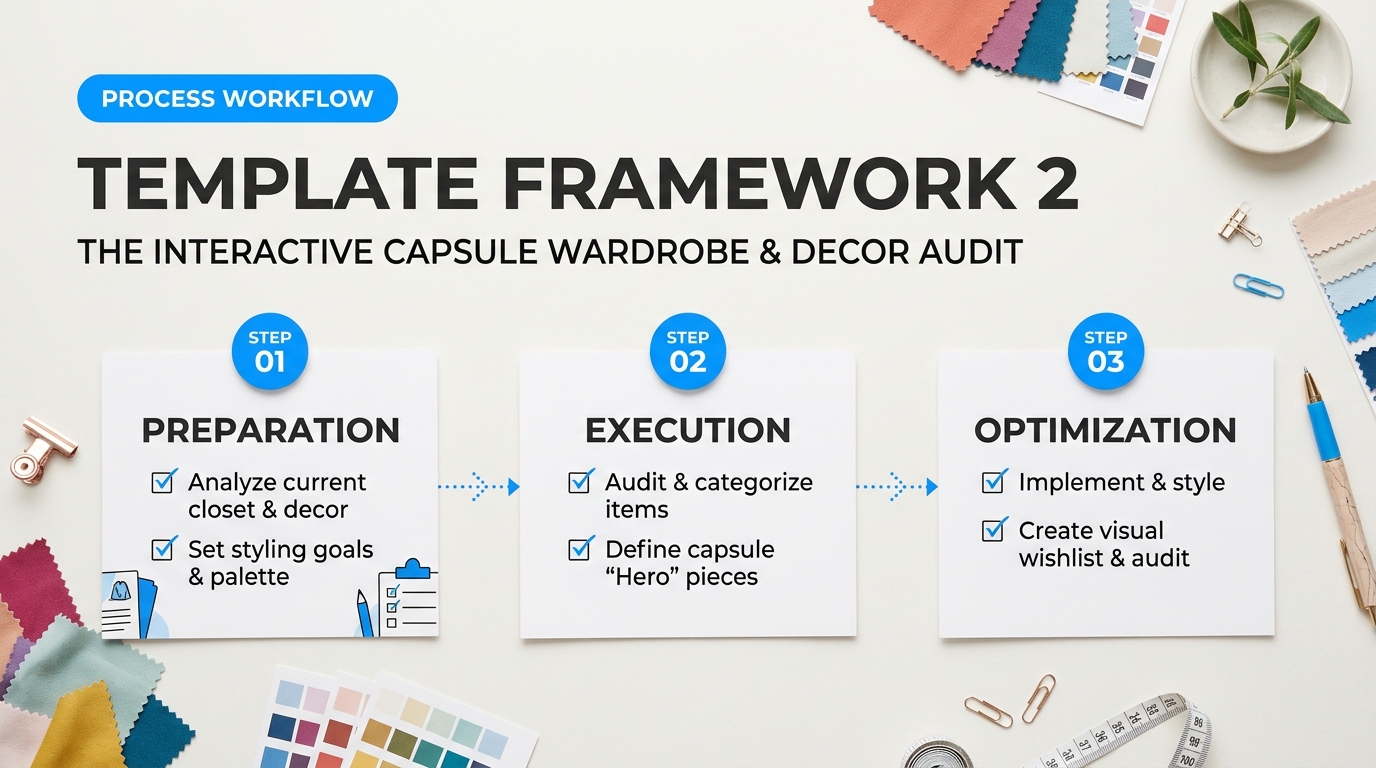
Fashion and home decor readers don’t need more inspiration boards. They already have hundreds of saved pins. What they lack is an objective filter to sort through their physical belongings. A static list of “wardrobe essentials” usually ends up forgotten in a downloads folder. This interactive audit template solves that problem by turning styling theory into an active, hands-on project your subscriber can finish on a Sunday afternoon.
The goal is clarity, not perfection. When you build this asset, you give your reader permission to let go of items that drain their energy. It bridges the gap between looking at pretty photos and building an intentional living space.
Structuring Lifestyle Blog Lead Magnet Templates for Wardrobe and Space Audits
When building lifestyle blog lead magnet templates for visual niches, your asset must deliver a fast dopamine hit. If your download feels like homework, completion rates plummet. Break the resource into three interconnected components: an objective scoring rubric, a visual planning grid, and an action-oriented declutter sprint.
| Audit Component | Fashion Blog Focus | Interior Decor Blog Focus | User Outcome |
|---|---|---|---|
| The Inventory Matrix | Categorizes garments by layer, silhouette, and fabric weight. | Catalogs furniture, accent pieces, and textiles by room zone. | Eliminates blind buying by showing exact surplus counts. |
| The 5-Point Rubric | Scores fit, comfort, condition, lifestyle match, and pairing ease. | Scores scale, functional purpose, lighting fit, color harmony, and wear. | Removes emotional bias from the decision to keep or purge. |
| The Capsule Grid | 3×3 grid pairing 3 tops, 3 bottoms, and 3 layering pieces. | Vignette moodboard matching 1 main piece with 2 supporting accents. | Validates styling versatility before spending money. |
The core of this template is its objective scoring rubric. Instead of asking readers how an item makes them feel, guide them through concrete criteria rated on a 1-to-5 scale. An item must hit a combined score of at least 20 out of 25 to stay in prime rotation.
- Fit or Proportion: Does this garment zip comfortably right now, or does that sideboard match the actual scale of your hallway wall?
- Utility Frequency: Has this item been worn or intentionally highlighted in the past four months?
- Material Health: Is the fabric pilling, stained, or frayed? Does the furniture finish show irreparable damage?
- Styling Friction: Can this piece instantly pair with at least three other items you already own?
- Lifestyle Alignment: Does this fit how you live today, or is it tied to a past routine you’ve outgrown?
Items scoring 19 or below drop into specific processing paths. Scores between 15 and 19 get flagged for alterations, re-styling, or minor repairs. Anything below 15 moves straight to the donation or resale pile. This removes guilt. Math makes the choice for them.
“Readers abandon 40-page lifestyle guides because the cognitive load is too heavy. But give them a single-page interactive matrix where they check boxes and see an instant score, and they will complete it before dinner.”
In a Reddit creator discussion on interactive audit templates, bloggers voiced concern over whether interactive formats justify the setup time compared to basic printables. The consensus among high-converting publishers is that interactivity drives retention. When readers plug in their numbers and watch an automated total shift, they treat the document like software rather than disposable paper.
Software Showdown: Notion vs. Canva for Interactive Audits
You don’t need custom code to build high-performing lead assets. Two platforms dominate this space, each serving distinct reader preferences.
Notion is the gold standard for readers who love functional databases. You can set up relational tables where readers check off clothing items and see their “Capsule Readiness Score” auto-calculate via rollups. It allows users to embed photos of their own clothes or rooms, tag colors, and filter by season. The downside? Notion has a small learning curve for non-technical users. If your blog caters to an older, less tech-savvy audience, Notion can feel intimidating.
Canva wins on visual appeal and accessibility. You can design an elegant, magazine-style PDF complete with clickable checkboxes and fillable text fields using Canva’s form-building elements. It works straight out of the box on mobile or desktop without an account. However, Canva documents cannot perform dynamic calculations. Readers must add up their scores manually, which slightly lowers the satisfaction of the audit.
If your brand centers on minimalism, productivity, and modern routines, deliver the template as a Notion workspace. If your audience prioritizes visual aesthetics, home staging, and quick printouts, a fillable Canva PDF is the smarter path.
The 60-Minute Rapid Declutter Blueprint
Most audits fail because they try to tackle the entire house or wardrobe at once. That leads straight to decision fatigue. Design your template around an explicit 60-minute timebox. Here is the exact structure to lay out for your subscribers:
Minute 00 to 15: The Surface Pull. Direct the reader to pick just one targeted zone. This could be their primary knitwear drawer, everyday shoe rack, coffee table styling, or dining room credenza. They must pull every single item out onto a clean bed or floor. No item remains hidden.
Minute 15 to 35: The Formula Scoring. The reader runs each item down the 5-point rubric inside the template. They enter the numbers without overthinking. Decisions happen in ten seconds or less per item. Instant reaction beats second-guessing.
Minute 35 to 50: The Four-Box Sorting Station. Every piece moves into one of four labeled bins: Keep (Active), Repair/Tailor (Two-Week Deadline), Resale/Donate (Out the Door), or Trash. Anything entering the Repair box gets an alert set in their phone calendar. If it isn’t fixed in two weeks, it automatically moves to donation.
Minute 50 to 60: Visual Grid Mapping. The subscriber slots their remaining “Keep” items into the 3×3 Capsule Grid on page three of the template. This visual mapping reveals immediate gaps in their collection. For instance, a reader might realize they have six striped tees but zero neutral layering jackets, or plenty of decorative candles but no functional ambient lighting.
This final step creates the ideal commercial opportunity. When your template shows readers what they’re missing, they naturally turn to your affiliate recommendations, shopping guides, and seasonal moodboards to complete their setup.
Template Framework 3: The Curated Meal Plan and Grocery Optimization Sheet
A list of dinner ideas won’t cut it anymore. Readers can find millions of free recipes on Pinterest in thirty seconds. When someone lands on your lifestyle site, they aren’t hunting for just another sheet pan chicken dinner. They want someone to lift the heavy mental burden of 5:00 PM kitchen decision fatigue. If your opt-in delivers loose recipe ideas without an execution system, it goes straight to the digital trash bin. That is why a structured, seven-day meal prep and grocery optimization sheet converts casual readers into dedicated subscribers so effectively.
Designing Lifestyle Blog Lead Magnet Templates for Meal Planning
To turn this asset into a runaway success, organize it into a modular four-part system. You aren’t just handing over recipes; you’re handing over an organized weekend routine. Your downloadable guide should contain four core pages that walk the reader through planning, purchasing, prepping, and eating without friction.
Start with the 7-Day Dinner Matrix. Build a clear, one-page grid mapping out five weeknight dinners and two flexible weekend meals. The secret to making this grid work is intentional ingredient overlap. If Monday’s dinner uses roasted butternut squash and quinoa, Thursday’s meal should use that exact same roasted squash inside a black bean burrito bowl. Food waste drops to zero. Your reader saves money, and they feel like a kitchen genius.
Pair that weekly overview directly with a 90-Minute Batch-Prep Checklist. Most readers abandon meal planning because cooking every single evening takes too long. Break their prep session down into manageable, chronological blocks:
- Wash and Chop (Minutes 0–25): Dice onions, chop hearty greens, slice peppers, and peel root vegetables. Store them in airtight glass containers with damp paper towels.
- Sheet Pan Roasting (Minutes 25–65): Roast root vegetables and sheet-pan proteins simultaneously at 400°F (200°C) while the oven is hot.
- Simmer and Steam (Minutes 35–70): Cook two base grains on the stovetop (like brown rice, farro, or quinoa) while sauces blend on the counter.
- Whisk and Blend (Minutes 70–85): Whip up two multi-purpose sauces or vinaigrettes to prevent midweek flavor fatigue.
- Pack and Label (Minutes 85–90): Chill containers completely before snapping lids shut to stop moisture from making vegetables soggy.
The Categorized Shopping Inventory and Aisle Layout
Traditional recipe shopping lists are notoriously frustrating. They list ingredients alphabetically or recipe by recipe. That forces readers to sprint back and forth across grocery aisles like contestants on a game show. Your optimization sheet needs to mimic the physical blueprint of a grocery store.
Divide the shopping sheet into distinct geographic zones:
- Zone 1: Fresh Produce: Group by leafy greens, sturdy cooking vegetables, fresh herbs, and fruit.
- Zone 2: Perimeter Proteins & Dairy: Meat, seafood, eggs, tofu, and dairy or plant-based alternatives.
- Zone 3: Center Pantry Staples: Canned beans, dry grains, stocks, oils, and spices.
- Zone 4: The “Shop Your Pantry First” Audit: A dedicated margin column where readers check off items they already keep stocked before stepping foot outside.
This layout alone turns a standard checklist into an indispensable household utility. When subscribers realize your printable cuts twenty minutes off their supermarket trip, they pin it to their fridge every single week.
The Dietary Customization Matrix
Rigid meal plans generate quick opt-outs. In a discussion on meal planner implementation pitfalls, creators revealed that rigid recipe cards fail because readers run into dairy sensitivities, gluten intolerances, or selective eaters at home. Build an adaptable swap sheet into the document so your audience can tailor the week to their personal dietary habits without recalculating portions from scratch.
| Meal Foundation | Default Profile | Plant-Based Swap | Gluten-Free Alternative |
|---|---|---|---|
| Base Grains | Farro or Couscous | Brown Jasmine Rice | Quinoa or Riced Cauliflower |
| Core Protein | Shredded Chicken Breast | Crispy Spiced Chickpeas / Tofu | Grass-fed Beef or Tempeh |
| Finishing Creams | Greek Yogurt Dressing | Soaked Cashew Crema | Tahini Lemon Drizzle |
Tool Selection: Canva Printables vs. Interactive Notion Hubs
How you deliver this framework depends on your audience’s technical habits. For busy parents who want physical sheets stuck to the refrigerator door, build this as an editable four-page PDF using Canva. Use clean typography, high-contrast checkboxes, and plenty of write-in margins. Keep graphics minimal so printing doesn’t drain their expensive color ink cartridges.
If your readers skew toward digital planners, deliver the framework as a pre-formatted Notion hub. Notion lets users toggle ingredients, drag meals between days when life gets chaotic, and auto-filter shopping items as they drop them into their cart. While Canva provides immediate aesthetic appeal, a dynamic digital workspace inside Notion or Airtable offers ongoing utility that keeps your blog’s brand front and center on their mobile devices daily.
“A great meal plan template shouldn’t just tell people what to eat. It should give them their Sunday afternoons and weeknight sanity back.”
By blending practical scheduling, aisle-optimized shopping, and simple ingredient substitutions, you turn standard lifestyle blog lead magnet templates into indispensable tools your subscribers rely on week after week.
How to Customize Lifestyle Blog Lead Magnet Templates in Canva and Notion
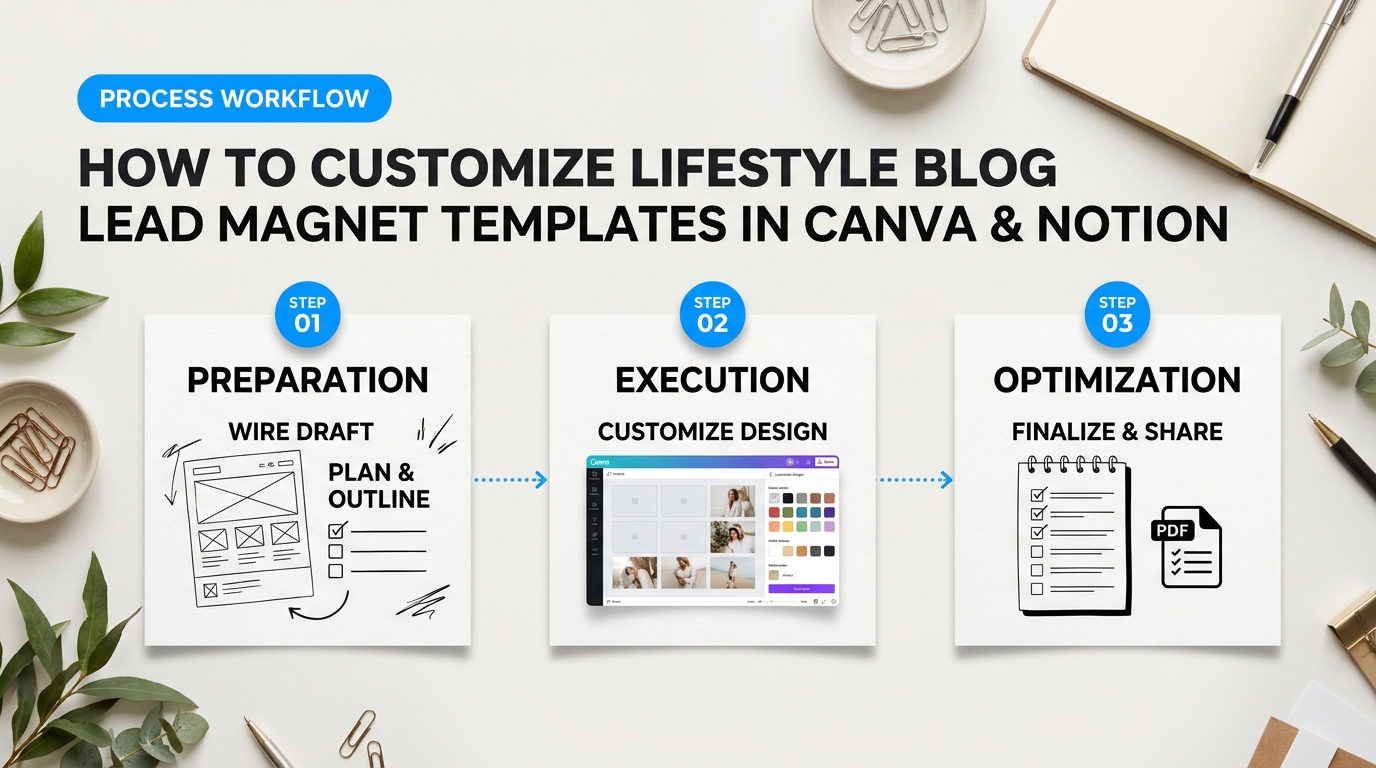
Pre-made layouts save dozens of hours of design work. Yet dropping unedited stock files into your marketing funnel rarely converts casual readers into dedicated subscribers. If your resource looks like a generic Canva clone, your audience notices right away. In fact, many creators on Reddit discuss common pitfalls when customizing digital marketing templates, specifically citing broken links, bloated file sizes, and mismatched typography as conversion killers.
Customizing your lifestyle blog lead magnet templates correctly bridges the gap between clean design and direct revenue. Whether you build printable workbooks or interactive digital dashboards, tailoring these assets guarantees your brand stays memorable.
Step-by-Step Customization for Lifestyle Blog Lead Magnet Templates
Setting up your template takes four structured phases. Follow this checklist inside Canva or Notion to build high-converting lead magnets that look custom-made.
1. Apply Your Brand Kit and Color Palette
Think of your brand palette like interior paint. Keep 70% of the page clean and neutral (white, cream, or light grey), reserve 20% for your secondary brand tone, and use your sharpest accent color on the remaining 10% for buttons, checkboxes, and key takeaways. In Canva, open your Brand Hub and apply your saved styles with one click. In Notion, match page covers, callout backgrounds, and tag colors directly to your blog’s hex codes.
2. Lock Down Your Typography Hierarchy
Messy text styling repels readers faster than bad graphics. Stick to two font families maximum: one serif or bold sans-serif for titles, and a clean, legible sans-serif for body paragraphs. Set clear rules across your document:
- Primary Headers (H1): 28–36 pt font size, bold weight. Use this for main page titles and module headers.
- Section Subheads (H2/H3): 16–20 pt font size, medium weight. Use these to separate actionable steps.
- Body Copy: 10–12 pt font size with at least 1.3 line spacing. Never shrink body text below 10 pt, or your printable routines will be unreadable on paper.
3. Embed Affiliate Links and Resource Callouts Organically
Lead magnets should solve immediate problems while generating passive affiliate revenue. When recommending kitchen gear, skincare items, or organization bins, weave links into native text callouts instead of slapping raw banners across the page. In Canva, highlight your link text or graphic element, click the link icon, and paste your tracked URL. In Notion, use bookmark cards or inline hyperlinks within callout blocks. Always include clear FTC micro-copy at the bottom of the page (e.g., “This guide contains affiliate links. We may earn a small commission at no extra cost to you.”).
4. Export the Correct Format for Reader Intent
Different readers need different formats. Match your export settings to how your audience actually uses your content.
| Tool | Output Format | Best Reader Use Case | Customization Pro-Tip |
|---|---|---|---|
| Canva Pro | PDF Standard | Digital reading on iPads, phones, or desktops. | Keeps hyperlinked affiliate links active and compresses images for fast download speeds. |
| Canva Pro | PDF Print (CMYK) | Physical planners, grocery checklists, and binder inserts. | Enable “Crop marks and bleed” to avoid awkward white margins when printed at home. |
| Notion | Public Web Link (Duplicate enabled) | Dynamic wardrobe audits, habit trackers, and meal planners. | Lock the parent page under the share menu so users don’t accidentally edit your master layout. |
Field Check: Test every single link before uploading your lead magnet to your email service provider. Open the exported PDF on a smartphone. Tap every button, check the line wrapping, and make sure your affiliate tags track properly inside private browsing tabs.
If you prefer dedicated desktop software over cloud apps, tools like Adobe InDesign provide sharper vector control for intricate printables. But for most lifestyle bloggers, Canva and Notion deliver the best balance of speed, cost-effectiveness, and ease of use. Keep your styling simple. Focus on legibility and ease of use, and let your unique lifestyle systems do the selling.
The Fill-in-the-Blank Copywriting Wireframe for Lead Magnet Landing Pages
Great design attracts eyeballs, but sharp words win subscribers. Even the most helpful morning routine checklist or seasonal meal guide will sit untouched if your landing page copy feels vague, boring, or pushy. Most creators freeze up when faced with a blinking cursor. You don’t need a marketing degree to write a page that converts at 40% or higher. Think of a copywriting wireframe like a clothes hanger. It gives your message a clear structure so your readers immediately recognize the value and say yes.
When you build these pages, your software choice matters just as much as your copy. Flodesk is beloved by decor and fashion bloggers because its built-in layouts look like editorial magazine spreads with zero coding. ConvertKit takes a more utilitarian approach, giving you faster loading speeds, deep audience segmentation, and reliable split-testing tools. Whichever platform you use, pairing it with a proven messaging layout ensures your hard work turns into steady subscriber growth.
Structuring Lifestyle Blog Lead Magnet Templates for Maximum Conversions
Lifestyle audiences do not browse the web looking for sales pitches. They look for inspiration, calm, and practical shortcuts to make their everyday routines easier. Adapting your lifestyle blog lead magnet templates to this fill-in-the-blank structure strips away the guesswork and guides your reader straight to the download button.
The Above-the-Fold Header Block
Eyebrow Tag: Free [Resource Type: Guide / Checklist / Meal Plan / Workbook]
Primary Headline: How to [Achieve Desirable Lifestyle Result] Without [Biggest Pain Point, Hassle, or Expense]
Subheadline: Stop wasting hours on [Common Frustrating Task]. Grab this step-by-step [Format] to create a [Positive Feeling: Calmer / More Organized / Stylish] life in under [Time Frame].
Keep your headline punchy. Readers decide whether to stay on your page in less than three seconds. Use clear, sensory words that match your niche. If you run a home organization blog, speak directly to the dreaded laundry mountain or the overflowing pantry. If you run a slow-living blog, focus on reclaiming quiet mornings.
The Empathy & Agitation Paragraph
“If you are tired of [Daily Hassle, e.g., staring at a packed closet with nothing to wear], you are not alone. Most [Target Audience, e.g., busy working moms] spend [Time/Money Wasted] trying to fix [Core Problem], only to end up feeling [Negative Emotion: overwhelmed / exhausted / frustrated]. It doesn’t have to be this hard.”
This paragraph proves you understand their world. You aren’t judging their messy schedule or disheveled entryway. You are meeting them right where they are today.
The Three-Part Benefit Bullet Formula
- The Quick Win: The exact [Framework / 5-step checklist] to [Tackle Small Milestone] in just [Time Period]—even if you’ve never tried this before.
- The Resource Saver: How to cut out [Unnecessary Expense or Time Drain] without sacrificing your [Favorite Lifestyle Pleasure / Personal Style].
- The Long-Term Shift: A foolproof system to maintain [Sustained Lifestyle Change] so you never have to deal with [Original Frustrating Friction] again.
Notice how every single bullet combines a tangible tool with an emotional payoff. Don’t just list what is inside the PDF. Tell them how their Sunday afternoon will feel once they use it. Features tell people what they are downloading. Benefits tell them why they should care.
Placing Social Proof and Friction-Free CTAs
Where you position your reviews and forms changes everything. Many beginners bury their opt-in form at the very bottom of a long narrative. That kills conversion rates on mobile devices. Place your form directly beside your bullets on desktop, and immediately beneath the subheadline on mobile screens.
The Micro-Social Proof Snippet
“Join over [Subscriber Count, e.g., 8,500+] readers who use this exact checklist to reset their homes every Sunday.”
“This capsule guide saved me two hours of stress every single week.” — [First Name, City/Handle]
You don’t need hundreds of reviews to make this work. A single sentence from an Instagram direct message or blog comment works wonders. Relatable praise from everyday readers builds instant trust.
The High-Converting Call-to-Action (CTA) Formula
Button Text: Send Me the Free [Name of Resource]!
Microcopy Reassurance: 100% free. No spam ever. Unsubscribe with one click anytime.
Never label your button with cold, technical commands like “Submit” or “Download Here.” Use first-person action phrases like “Send My Meal Plan” or “Give Me the Checklist.” It sets up an exciting mental reward rather than an online chore.
| Wireframe Section | The Big Mistake | The High-Converting Fix |
|---|---|---|
| Headline | Being clever or poetic (“Bloom Into Your Best Self”) | Focusing on a concrete transformation (“A 15-Minute Morning Routine for Busy Days”) |
| Bullet Points | Listing features (“Contains 12 pages and 4 tables”) | Showing lifestyle benefits (“Cut your weekly grocery bill by $50 without clipping coupons”) |
| Form Fields | Asking for phone numbers, last names, and addresses | Requesting only a first name and email address to eliminate friction |
| Button Copy | Generic verbs (“Submit” or “Sign Up”) | First-person ownership (“Get My Wardrobe Planner”) |
Creators often question whether sticking to a rigid wireframe takes away from their personal voice. As explored in community discussions on wireframe landing page performance, structured layouts almost always outperform open-ended prose because they respect the reader’s limited time. When someone visits your lifestyle blog from Pinterest or TikTok, they want fast answers. Keep the page brief. Make the transformation obvious. Give them a simple reason to hand over their email address, and your list will grow on autopilot.
The Technical Setup and Automated Delivery Checklist
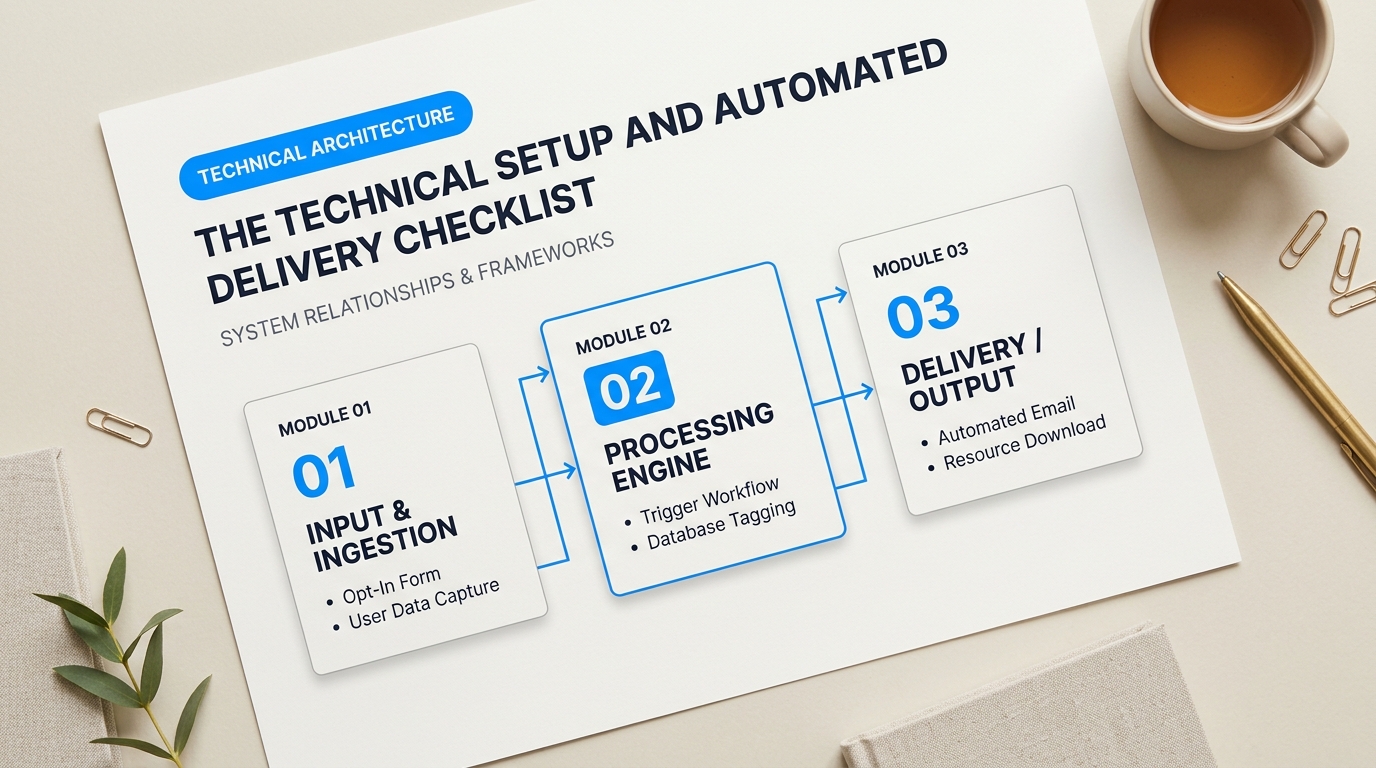
Even the most stunning lifestyle blog lead magnet templates will fail if your subscribers never actually receive their files. Nothing kills enthusiasm faster than an empty inbox and a missing download link.
Building high-converting funnels requires a dependable engine beneath the hood. When someone types their email into your opt-in form, three things must happen within seconds: the subscriber receives a tag, your email platform triggers an automated sequence, and a secure server delivers the file without triggering spam filters.
Phase 1: Asset Hosting and CDN Distribution
Never attach a PDF directly to a welcome email. Heavy attachments trigger spam filters, increase bounce rates, and eat up email storage quotas. Email filters view unexpected attachments as potential malware risks.
Think of a Content Delivery Network (CDN) like a local corner store. Instead of forcing every reader to drive across the country to your blog’s central server to pick up a file, a CDN puts copies of your download in digital storefronts all over the world. Your readers get instant access, and your website host never slows down.
Upload your finished PDFs, Notion clone links, or printable spreadsheets to a dedicated storage layer:
- Cloudflare R2 or Amazon S3: Inexpensive storage with zero egress fees or penny-level bandwidth costs. Excellent for high-volume lifestyle blogs distributing thousands of downloads per month.
- Google Drive or Dropbox: Acceptable for brand-new blogs, but risky at scale. Bandwidth limits can lock down shared links if a blog post suddenly goes viral on Pinterest.
- Your ESP’s Internal Media Library: Platforms like Kit allow you to host small files directly on their servers and link to them with clean download buttons.
Phase 2: Tagging and Segmentation Architecture
A messy subscriber list is impossible to monetize later. If a reader downloads a capsule wardrobe planner, you shouldn’t send them weekly emails about vegan meal prep without asking first. You need clear labels from day one.
Tagging acts like a digital sticky note placed on a reader’s profile the exact second they opt in. Set up your tags using an intuitive naming system: [Asset] - [Topic] - [Name]. For instance, someone grabbing a home organization sheet receives the tag DL - Organization - SpringCleanGuide.
| Platform | Best For | Key Setup Advantage |
|---|---|---|
| Kit (formerly ConvertKit) | Full-time lifestyle creators scaling multiple content verticals. | Visual automations handle multiple lead magnet tags without duplicating contacts or raising list costs. |
| MailerLite | Bootstrapped blogs needing clean drag-and-drop design on a budget. | Intuitive embedded form builders and generous free-tier automation workflows. |
Phase 3: The Opt-In Verification Decision
Should you use single opt-in or double opt-in? Lifestyle creators debate this constantly.
Single opt-in gives instant gratification. Readers enter their email, click submit, and get the resource immediately. Your list grows 20% to 30% faster this way. The downside? You will collect typos, disposable email addresses, and bot signups that damage your sender reputation over time.
Double opt-in sends a confirmation email first. The reader must click a confirmation button before receiving the download. Many creators worry this step hurts conversions, but it guarantees an ultra-clean list of real, engaged humans. In marketing forums, creators often discuss spam traps and technical delivery bugs; many run straight into these lead magnet delivery pitfalls on Reddit when skipping list hygiene entirely.
Pro Tip for Inbox Deliverability: If you use double opt-in, turn the confirmation button into the download trigger itself. Set the button link to open the PDF hosted on your CDN. The subscriber confirms their address and gets their resource in one single click.
Automating Delivery for Lifestyle Blog Lead Magnet Templates
Once your tags and forms connect to your Email Service Provider (ESP), build an automated workflow that runs without your manual input. The initial sequence should follow a structured three-step progression over their first week:
Step 1: The Instant Gratification Email (Sent at 0 minutes)
Do not pitch products here. Do not tell your entire life story. Keep it punchy. Remind them what they requested, give them a bold, high-contrast download button, and tell them where to save it. Add a short one-sentence prompt asking them to reply to the email with one word (like “Received!”) to teach Gmail and Yahoo that your messages belong in the primary inbox.
Step 2: The Quick Win Follow-Up (Sent 24 to 48 hours later)
Check in on their progress. If they downloaded a printable budget tracker, ask if they printed it out yet. Offer one practical tip that makes using the download easier. This builds trust and positions you as a helpful guide rather than a faceless blogger.
Step 3: The Transition to Your Core Content (Sent 4 days later)
Introduce your publication schedule. Explain what topics your regular newsletter covers, when it arrives, and how it helps them curate their lifestyle. Add an unenroll link specific to that sequence so subscribers can opt out of automated tips without leaving your primary newsletter list entirely.
Pre-Flight Technical Verification
Before publishing your landing page, run this rapid quality test:
- Open a private browsing window to avoid cached form cookies.
- Sign up using two test addresses: one on Gmail and one on an Apple/iCloud or Yahoo domain.
- Check mobile rendering. Over 70% of lifestyle blog traffic comes from phones; ensure download links open smoothly on iOS Safari and Android Chrome.
- Verify domain authentication. Make sure your sending domain has active SPF, DKIM, and DMARC records configured in your DNS settings so your automated deliveries avoid the promotions or junk tabs completely.
What Metrics Matter Most? A Post-Launch Optimization and Diagnostic Checklist
Launching your opt-in is not the finish line. It is the starting gate. Many lifestyle creators celebrate when their download counter ticks upward, only to wonder why their weekly newsletter still gets crickets. If new subscribers download your morning routine checklist or capsule wardrobe planner and immediately ghost you, your funnel is leaking.
You do not need an advanced analytics degree to fix this. You simply need to trace the reader’s journey from their first click on your blog post to their fourth week on your email list. Tracking the right data points shows you exactly where readers get stuck, lose interest, or head for the unsubscribe button.
| Funnel Stage | Key Metric | Healthy Target | What It Reveals |
|---|---|---|---|
| Blog to Form | Opt-In Conversion Rate | 2% – 5% (Inline), 15%+ (Dedicated Page) | Whether your offer matches the reader’s immediate problem. |
| Email Inbox | Initial Delivery & Open Rate | 60% – 75%+ | Spam placement and subject line clarity. |
| Resource Consumption | Asset Click-Through Rate | 40% – 55% | Subscriber eagerness to actually access the resource. |
| Long-Term Fit | 30-Day Retention Rate | 85%+ (Under 15% churn) | Whether your ongoing newsletter matches the freebie topic. |
Your choice of email marketing platform directly impacts how cleanly you can track these numbers. For lifestyle bloggers, the decision usually comes down to Kit (formerly ConvertKit) versus MailerLite. MailerLite offers a clean, visual layout with interactive click maps that make seeing reader engagement simple for beginners on a budget. Kit costs slightly more, but it provides superior custom reporting, granular subscriber tagging, and frictionless automation paths. Kit makes diagnosing exactly where subscribers stall out much easier as your list grows past five thousand readers.
Troubleshooting Lifestyle Blog Lead Magnet Templates After Launch
When evaluating lifestyle blog lead magnet templates, vanity metrics often hide deeper pipeline leaks. If your subscriber numbers look healthy but engagement drops off a cliff, work through this post-launch diagnostic checklist to isolate the failure point.
Scenario 1: High traffic, but opt-in rates hover below 1%.
Your readers like your writing, but your offer is invisible or irrelevant. Don’t immediately rewrite the entire freebie. Start by moving your opt-in form higher on the page. Place a visual mockup directly after your blog post’s opening hook, and repeat the call-to-action halfway through. If that fails to bump conversions, check the alignment. A reader reading a slow-fashion capsule wardrobe post rarely opts into a generic “10 Ways to Organize Your Life” PDF. Swap the copy to address the exact roadblock discussed on that specific page.
Scenario 2: Strong opt-ins, but the first email has a 25% open rate.
This is an inbox placement issue or an expectation mismatch. Check whether your confirmation emails land in the spam folder or Gmail’s Promotions tab. You might have triggered automated spam filters by loading your initial email with too many affiliate links or large image files. Keep that first email plain text with a single download link. Also, update your thank-you page. Tell subscribers the exact sender name and subject line to look for in their inbox so they can fish it out if it gets filtered.
Real creators frequently point out how hidden technical traps hurt new campaigns. As shared in marketing discussions around opt-in compliance and deliverability, edge cases like misconfigured sender records (DMARC and DKIM) and strict corporate email firewalls often kill delivery before a subscriber even sees the welcome note.
Scenario 3: Subscribers open the email, but nobody clicks the download link.
Cut the fluff. Readers signed up for an asset, not a five-paragraph personal backstory. Put the download button right at the top of the email. Write clear micro-copy: “Click here to make your personal copy of the Notion habit tracker.” Make the link stand out visually with generous whitespace around it.
Scenario 4: High download clicks, but massive unsubscribes on Email #2 and #3.
This happens when you fail to bridge the gap between your freebie and your regular newsletter persona. If someone downloads a budget meal planner, your next email shouldn’t be a random recap of your weekend trip to Paris. Introduce your second email by referencing the tool they just grabbed: “How did the grocery prep go this week? Here is the secret ingredient I use to make meal three stretch further.” Remind them why they joined, show how you solve related problems, and set clear expectations for how often you plan to write.
Run this diagnostic review two weeks after launching any new opt-in. Test one change at a time—the headline, the form position, or the initial email copy—and give it at least two hundred visits before tweaking it again. Small, methodical adjustments turn average opt-in forms into predictable list-building engines.
Turning One-Time Lead Magnet Downloads into an Engaged, Monetized Community
A massive subscriber list looks great on paper. It means nothing if nobody buys your products or joins your paid community. Too many creators get trapped celebrating raw opt-in counts while their deliverability quietly drops and their software bills steadily climb. When a reader downloads your resource, they aren’t pledging lifelong loyalty to your brand. They just want a quick fix for a cluttered closet, an unorganized kitchen, or an inconsistent morning routine.
Scaling Beyond Freebies with Lifestyle Blog Lead Magnet Templates
Bridging the gap between a single PDF download and a profitable business comes down to your follow-up sequence. Choosing the right email service provider plays a major role in that workflow. For design-forward creators who prioritize visual aesthetics, Flodesk offers stunning visual layouts and magazine-style typography right out of the box. Kit (formerly ConvertKit) offers deeper behavioral tagging, visual automations, and custom purchase triggers. As experienced creators emphasize in marketing discussions on automated lead nurturing pitfalls, letting thousands of disengaged freebie seekers linger on your list destroys your sender reputation and inflates your overhead costs. Clean out inactive subscribers every ninety days so you only pay for readers who actually care.
Your post-opt-in emails should feel like a real conversation rather than a stiff sales pitch. Send the template file immediately in your first email without cluttering the screen with upsells. Two days later, send a short check-in message asking a simple question: “Did you test out the checklist yet?” That single question prompts readers to write back. Those replies show email providers that your messages belong in the primary inbox rather than the promotions tab.
The real value of an opt-in isn’t the download itself; it’s the ongoing permission to help your reader solve everyday problems.
Once you establish that initial rhythm, introducing paid offers feels natural. Point your subscribers toward a low-cost digital companion—like an extended seasonal meal bundle or an editable Notion workspace—before presenting higher-tier coaching programs or premium brand partnerships. High growth comes from strong relationships, not giant vanity numbers. When you pair practical lifestyle blog lead magnet templates with genuine, automated relationship-building, casual visitors naturally become regular buyers who trust your recommendations.